Physical Installation of a frame TV against a wall
How to Install an Art-Mode TV Flush Against the Wall (Simplified Guide)
Hanging an art-style TV (like the Samsung "The Frame") completely flat against the wall looks amazing, but hiding the cables safely can feel complicated. This guide breaks down the process into clear, easy steps for a clean, professional, and code-compliant installation.
Step 1: Prep Your TV
Before doing anything on the wall, you need to prepare the back of the art television you have chosen.
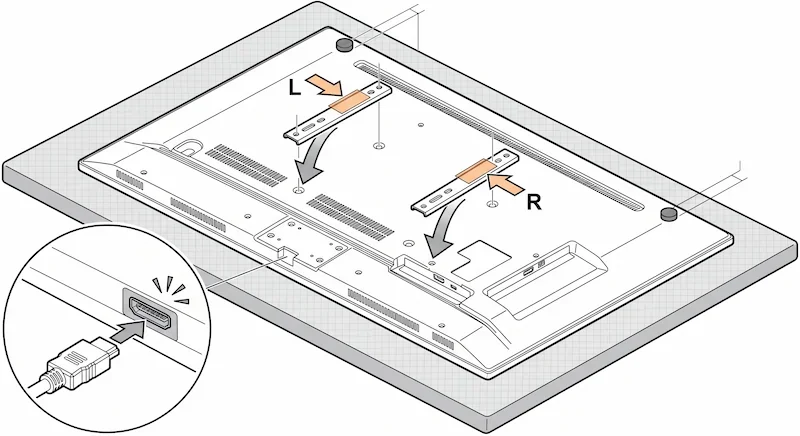
- Set up a safe workspace: Lay the TV face down on a clean, flat surface covered by a soft blanket or carpet to protect the screen from scratches.
- Attach the wall brackets: Find the Left (L) and Right (R) brackets provided in the box. Screw them into the back of the TV.
- Stick on the bumpers: Attach the small rubber bumper pads near the top corners of the TV. These keep the TV perfectly level and prevent it from scratching your drywall.
- Plug in the cable: Plug the main connection cable (the One Connect cable) into the back of the TV until it clicks, and route it through the built-in guide tracks.
Step 2: Find Your Studs and Line Up the Template
A heavy TV cannot hang on drywall alone; it must be securely screwed into the wooden studs inside the wall.
- Locate the studs: Use an electronic stud finder to find the wooden framing studs behind your drywall. Mark their positions with a pencil.
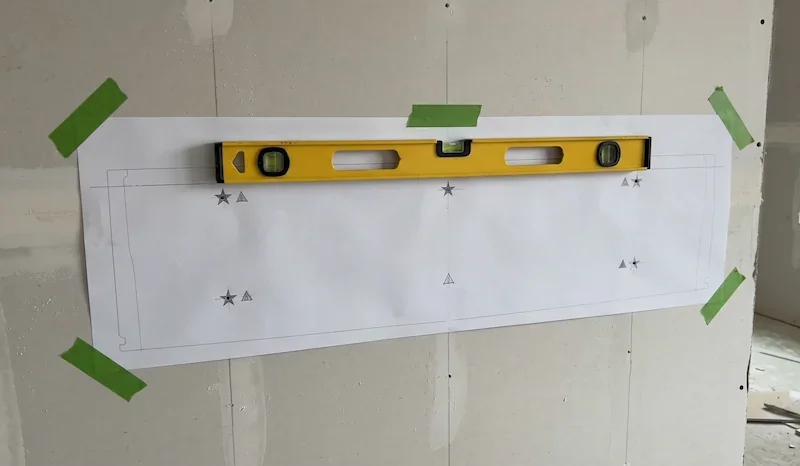
- Level and tape the template: Tape the paper installation template to the wall at your desired viewing height. Use a bubble level to ensure the paper is perfectly straight.
- Mark and drill: Mark your drilling points through the paper template into the center of the wooden studs. Drill small pilot holes using a 1/8-inch (3mm) drill bit to keep the wood from splitting.
Step 3: Handle the Cables Safely (The In-Wall Box)
This is the most critical part of the installation.
⚠️ Important Safety Warning: The Samsung One Connect cable carries both data and up to 100W of electrical power. Because it carries power, you cannot legally or safely hide this cable bare inside a standard drywall wall. It is a fire hazard.
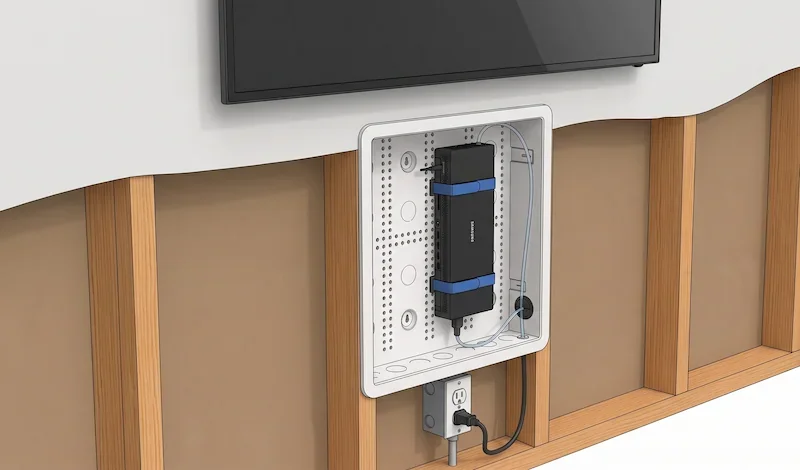
To hide everything safely and legally, professional installers use a plastic recessed media box that sits inside the wall directly behind the TV.
Choosing Your Box Size
Plastic boxes (like the Legrand On-Q series) are ideal because they don't block Wi-Fi or Bluetooth signals from devices hidden inside.
| Box Model | Best Used For | Features |
|---|---|---|
| 9-Inch Box (ENP0900NA) | Small streaming sticks (Roku, Apple TV) and basic wires. | Fits small spaces, easy to clip into drywall. |
| 17-Inch Box (ENP1700NA) | The bulky Samsung One Connect Box and extra devices. | Massive storage space with a built-in grid to strap down gear. |
How to Install the Box:
- Cut the drywall: Use the template provided with the box to draw a rectangle on the wall between two studs. Carefully cut it out with a drywall saw.
- Mount the box: Insert the plastic box into the hole. Tighten the built-in clips until the box grips the drywall tightly, or screw it directly into the wooden studs.
- Add power: Install a standard electrical outlet inside the bottom of the box so you can plug your electronics directly inside the wall cavity safely.
- Hide the gear: Place your Samsung One Connect Box inside the wall box and secure it with the included straps. Plug it into the outlet you just installed.
Step 4: Hang and Secure the TV
With the wall brackets up and the media box hidden, you are ready to hang the TV.
- Lift with help: Always use two people to lift the TV to avoid twisting the frame or straining your back.
- Hook it onto the mount: Tilt the TV slightly, line up the brackets on the back of the TV with the wall mount, and slowly lower it until it hooks into place.
- Check the fit: Gently tug down on the TV to ensure it is completely locked in and sits perfectly flat against the wall like a picture frame.